
Onboarding in React Native Doesn’t Have to Be Hard
 Błażej Kustra•Oct 30, 2025•2 min read
Onboarding is usually the first thing users see in your app and it’s surprisingly hard to get it right in React Native. Most developers either hack together a FlatList, wrestle with animations, or skip onboarding entirely. The result? A clunky first impression.
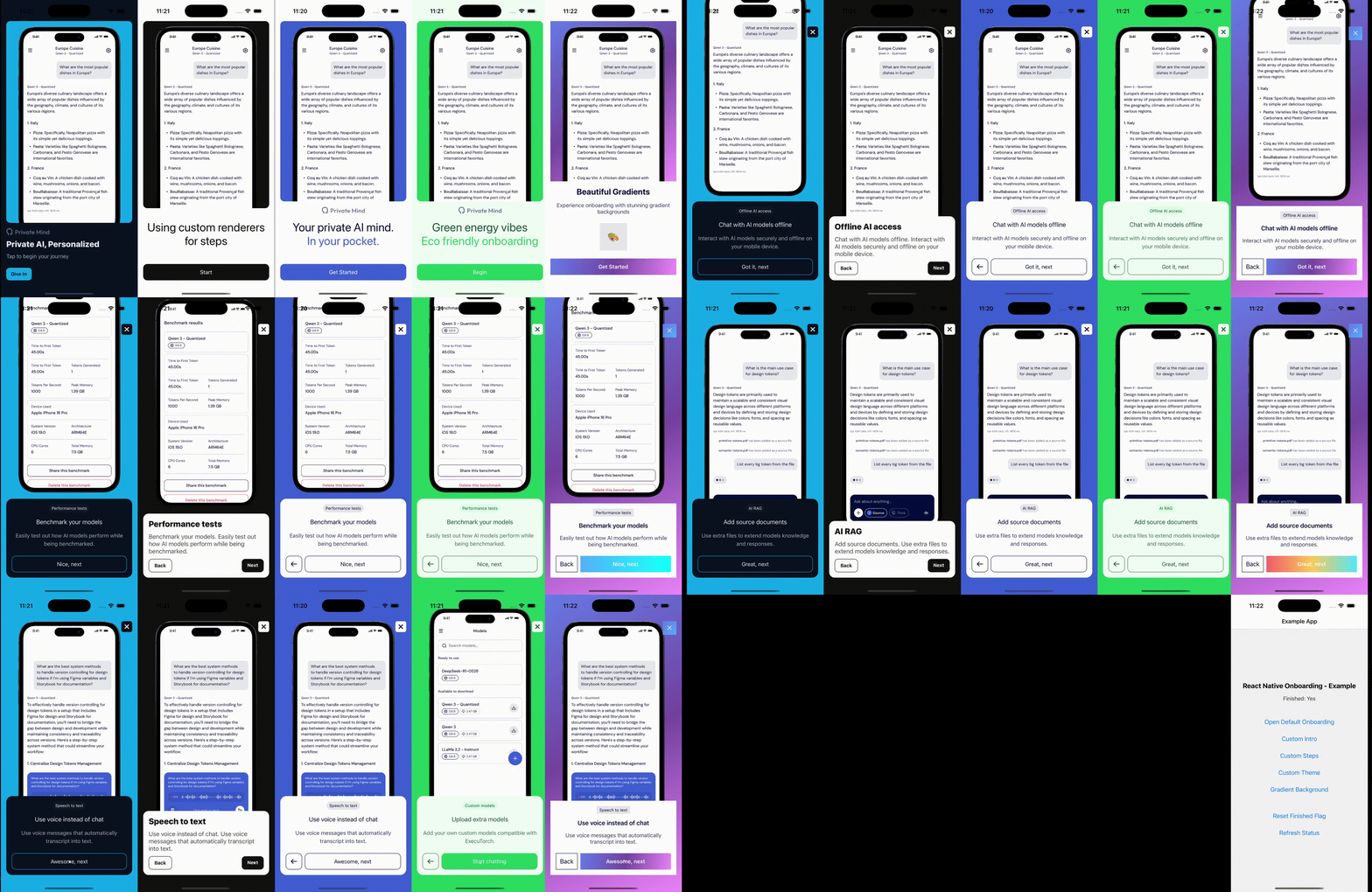
Creating a smooth, beautiful, and customizable flow that works consistently on iOS, Android, and web often takes much more effort than it should. That’s why I built react-native-onboarding library for user-friendly onboarding/tutorial flows with smooth animations, theming and complete flexibility.
Key features
- Cross-platform: works on iOS, Android, and web
- Smooth animations: powered by
react-native-reanimated - Works out of the box: get started with default styles instantly
- Customizable: replace any panel, step, or button with your own components
- Flexible theming: control colors, fonts, layouts to match your app design
Installation
Install the package and required dependencies to get started:
npm install @blazejkustra/react-native-onboarding
npm install react-native-reanimated react-native-safe-area-context
Usage
You can start with the default UI by providing an intro panel and a list of steps:
import Onboarding from '@blazejkustra/react-native-onboarding';

function MyOnboarding() {
  return (
    <Onboarding
      introPanel={{
        title: 'Welcome to My App',
        subtitle: 'Let\'s get you started',
        button: 'Get Started',
        image: require('./assets/logo.png'),
      }}
      steps={[
        {
          title: 'Step 1',
          description: 'This is the first step of your journey',
          buttonLabel: 'Next',
          image: require('./assets/step1.png'),
          position: 'top',
        },
        {
          title: 'Step 2',
          description: 'Learn about our amazing features',
          buttonLabel: 'Continue',
          image: require('./assets/step2.png'),
          position: 'bottom',
        },
      ]}
      onComplete={() => console.log('Onboarding completed!')}
      onSkip={() => console.log('Onboarding skipped')}
      onStepChange={(step) => console.log('Current step:', step)}
    />
  );
}
Custom components
Want to bring your own design system? You can swap out the intro panel, steps, background, or even the close button:
<Onboarding
  introPanel={CustomIntro}
  background={CustomBackground}
  skipButton={CustomCloseButton}
  steps={[
    {
      component: CustomStep,
      image: require('./assets/step1.png'),
    },
    ...
  ]}
/>
This way, you get all the animations and flow logic, but full freedom over visuals.
Try it out
If you want to deliver a decent onboarding experience in React Native without fighting with layouts and different platforms, hopefully this library will save you a lot of time, so be sure to give it a try in your next project: https://github.com/software-mansion-labs/react-native-onboarding!
If you find it useful, consider giving the project a ⭐ on GitHub, we would really appreciate it!
We’re Software Mansion: multimedia experts, AI explorers, React Native core contributors, community builders, and software development consultants.