How React Native Reanimated Updates the Styles — a Deep Dive
 Patrycja Kalinska•Mar 11, 2025•5 min read
There are a lot of props and styles in React Native and they fall into different categories. We can distinguish Non-layout Props (UI), Layout Props (Native) and JS Props, each with their own specifications. Although I’ll use the terms UI and Native throughout this post — because they are the labels used in our implementation — more accurate names are Non-layout and Layout. This is because, in some way, all props can be considered UI (since they all update on UI) and Native (since they are updated by native code).
While the final classification happens on the Native side, some props in React need to be preprocessed before (e.g., colors) while others don’t (e.g., opacity). We need to do that to ensure proper rendering and animation behavior.
For example, color-related properties — whether specified as a named value like black, a hex value like #000, or an RGB format like rgb (0, 0, 0) — must be converted into a numerical representation that the internal native layer can interpret. Once processed, props are sent to the native side, where they are classified and updated accordingly.
Classification
We classify props mainly for one reason — optimization. This allows each type of prop to be handled in a specific way that speeds up the updates. I’ve included a diagram for you below to visually represent the simplified path of the prop. Keep in mind that this applies only when one prop changes at a time. If you mix layout props with non-layout props, all of them will be updated as Native — through Shadow Tree.
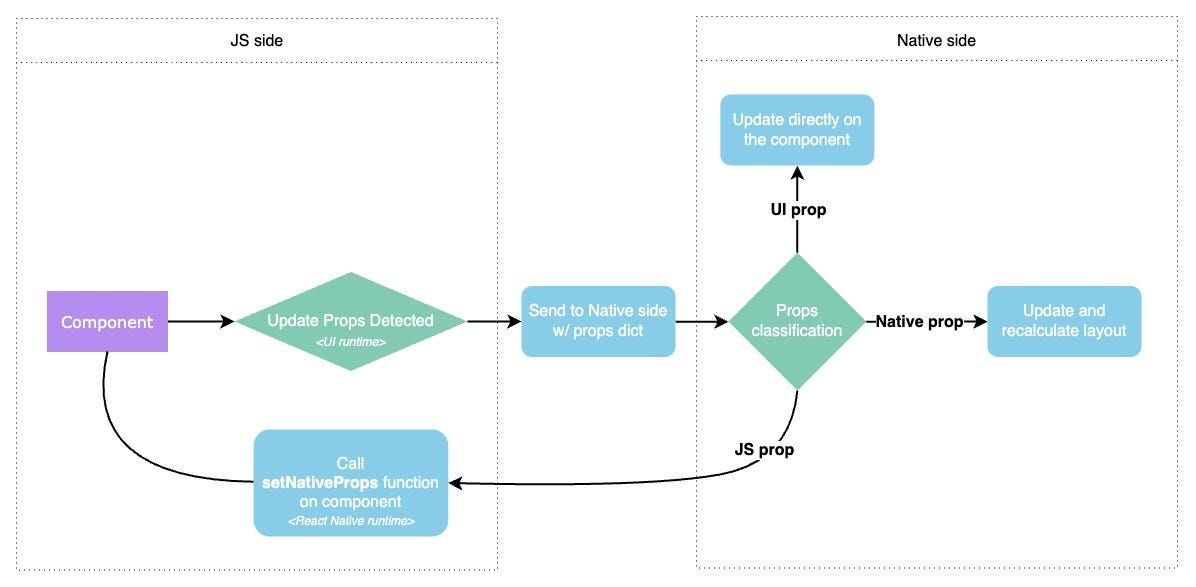
In Reanimated, we introduced a custom props allowlist: a dictionary containing UI and Native props. It includes many fundamental props, ensuring you don’t have to worry about complex configuration (be sure to check the full list here). We can also retrieve related props for a specific component by simply checking its validAttributes. So, you might be wondering: why not rely solely on that? Why hardcode props at all? Unfortunately, validAttributes doesn’t always return all props reliably. However, to ensure full compatibility, we adjust our allowlist by adding props obtained from validAttributes. And that’s where the addWhitelistedUIProps function comes in. Let’s dive in, shall we?
Reanimated offers two functions for this purpose: addWhitelistedUIProps and addWhitelistedNativeProps. These let you mark certain properties so they’re properly handled by our functions when updating components.
A common example from the documentation is TextInput. The text property isn’t included in our props allowlist because some components use it as a JS prop. So if you need text in your example, you’ll need to add it explicitly. Similarly, we have the Circle component from react-native-svg. I’ve included a code snippet below with comments that explain what’s happening:
// create Animated version of Circle component from `react-native-svg`
const AnimatedCircle = Animated.createAnimatedComponent(Circle);

// add `r` as a Native property to our allowlist
Animated.addWhitelistedNativeProps({ r: true });

export default function SvgExample() {
  const sv = useSharedValue(0);
  sv.value = withRepeat(withTiming(1, { duration: 500 }), -1, true);
  // create animated props for AnimatedCircle component
  const animatedProps = useAnimatedProps(() => {
    return {
      r: `${1 + sv.value * 49}%`,
    };
  });
  return (
    <View style={styles.container}>
      <Svg height="200" width="200">
        <AnimatedCircle
          cx="50%"
          cy="50%"
          fill="lime"
          animatedProps={animatedProps}
        />
      </Svg>
    </View>
  );
}
What about those props?
Every UI prop can also be interpreted as a Native Prop, so why do we need to distinguish between the two? The answer, as often in this case, is optimization. A UI prop doesn’t require layout recalculations, meaning it can be directly updated on the component.
For example, opacity is an UI prop and it only alters the visual appearance. You may not know this but transform is another UI prop. If you have a component with position: absolute, meaning it doesn’t affect the layout, it’s recommended to use transform: translateX instead of left or right. It’s because the latter are native props and less efficient because of triggering a reflow.
If you are wondering — a layout recalculation (or reflow) is a process that updates the position and size of components in the view hierarchy. It recalculates new bounds of the affected components, checks if any siblings or children are impacted, and adjusts the layout based on the calculated values.
There is also a third type of prop — the complex one, namely JS prop. This prop doesn’t have a direct equivalent on the native side, meaning it can’t be set like a regular native prop. If we want to animate custom components using setNativeProps, we should set the related prop as JS prop. An example of JS prop you may know is path from SVG components.
In the backstage, on Native side, we first check if a prop should be handled by us. If it’s a JS prop, we won’t find it in our allowlist dictionary. That’s when we delegate it back to the JavaScript thread and call setNativeProps on the related component. From there, it’s up to the component to process the update correctly.
Disclaimer
It’s worth noting that the three-category classification (Non-layout Props, Layout Props, and JS Props) applies specifically to Reanimated 3. In Reanimated 4, due to issues with view measurement and touch detection for animated components, we’ve decided to handle Non-layout Props and Layout Props in the same way — both now pass through the ShadowTree.
Wrapping up
From my perspective, understanding how Reanimated handles props — UI, Native, and JS — gives you more control over your animations, performance, and the structure of your components. While it’s nice-to-know for basic usage, it becomes particularly useful when dealing with components that don’t behave as expected.
Thanks for reading! And remember: experiment, debug, and (hopefully) everything will fall into place.✨ If not, you can always reach out to us for help — you can find us on SWM Discord in the #reanimated channel. 😉